
- Posts: 4
- Thank you received: 0
Forum
- You are here:
- Home
- Forum
- Components
- JC Tables
- Data Form plugin in insert mode doesn't work
Data Form plugin in insert mode doesn't work
- Hessel Tacoma
- Topic Author
- Offline
Less
More
1 year 10 months ago - 1 year 10 months ago #61
by Hessel Tacoma
Data Form plugin in insert mode doesn't work was created by Hessel Tacoma
I wanted to implement the Data Form plugin to add new rows to my table. I have configured the plugin, both the Plugin Config and the Form HTML. I marked the plugin as a Table plugin and it shows the button on the front-end table. But when I click this button, I get the following error:
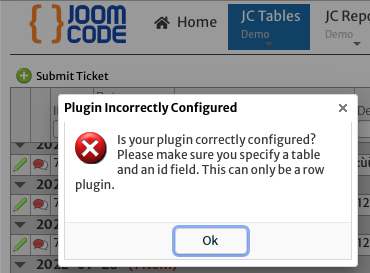
As you can see on this picture, this error also occurs on the JCTables demo site, on the Web Tickets demo.
Please provide a solution.
As you can see on this picture, this error also occurs on the JCTables demo site, on the Web Tickets demo.
Please provide a solution.
Attachments:
Last edit: 1 year 10 months ago by Hessel Tacoma.
Please Log in or Create an account to join the conversation.
- JoomCode Admin
-

- Offline
Less
More
- Posts: 23
- Thank you received: 3
1 year 10 months ago - 1 year 10 months ago #62
by JoomCode Admin
Replied by JoomCode Admin on topic Data Form plugin in insert mode doesn't work
Hi Hessel,
Please allow us a day or 2 to follow up on this, the demo site is one or 2 versions behind, so it might be out of sync with the latest version of JCTables.
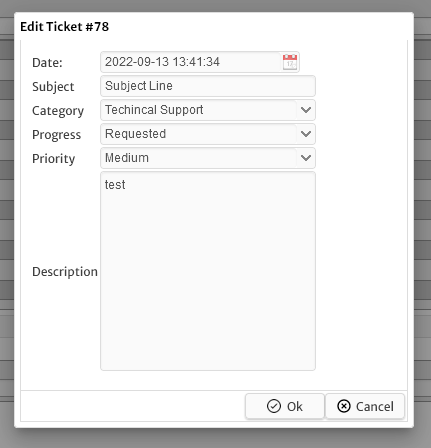
We see the edit works, but not the insert.
I am assuming you have the latest version of JCTables.
In the meantime, herewith some points to make sure are in place on your side (sample below is plugin configured to edit), and button set for row display
Data Form WikiDocs
Plugin : "Data Form"
Plugin Config : {
"tableName" : "jctickets",
"indexField" : "id",
"formAction" : "edit"
}
Form Html :
<table style="margin: 10px;">
<tr>
<td>Date:</td>
<td><input class="easyui-datetimebox" name="date_time" style="width:200px" data-options="required:true"></td>
</tr>
<tr>
<td>Subject</td>
<td><input class="easyui-textbox" name="subject" style="width:100%;" data-options="required:true"></td>
</tr>
<tr>
<td>Category</td>
<td>
<select class="easyui-combobox" name="supportcategory_id" style="width:100%;">
<option value="1">Clock Enquiry</option>
<option value="2">General Enquiry</option>
<option value="3">Payroll Enquiry</option>
<option value="4">Techincal Support</option>
</select>
</td>
</tr>
<tr>
<td>Progress</td>
<td> <select class="easyui-combobox" name="progress" style="width:100%;">
<option value="requested">Requested</option>
<option value="completed">Completed</option>
<option value="inprogress">In Progress</option>
<option value="closed">Closed</option>
</select>
</td>
</tr>
<tr>
<td>Priority</td>
<td><select class="easyui-combobox" name="priority" style="width:100%;">
<option value="none">None</option>
<option value="low">Low</option>
<option value="medium">Medium</option>
<option value="high">High</option>
</select>
</td>
</tr>
<tr>
<td>Description</td>
<td><input class="easyui-textbox" name="description" multiline="true" style="width:100%; height:200px;"></td>
</tr>
</table>
Please allow us a day or 2 to follow up on this, the demo site is one or 2 versions behind, so it might be out of sync with the latest version of JCTables.
We see the edit works, but not the insert.
I am assuming you have the latest version of JCTables.
In the meantime, herewith some points to make sure are in place on your side (sample below is plugin configured to edit), and button set for row display
Data Form WikiDocs
Plugin : "Data Form"
Plugin Config : {
"tableName" : "jctickets",
"indexField" : "id",
"formAction" : "edit"
}
Form Html :
<table style="margin: 10px;">
<tr>
<td>Date:</td>
<td><input class="easyui-datetimebox" name="date_time" style="width:200px" data-options="required:true"></td>
</tr>
<tr>
<td>Subject</td>
<td><input class="easyui-textbox" name="subject" style="width:100%;" data-options="required:true"></td>
</tr>
<tr>
<td>Category</td>
<td>
<select class="easyui-combobox" name="supportcategory_id" style="width:100%;">
<option value="1">Clock Enquiry</option>
<option value="2">General Enquiry</option>
<option value="3">Payroll Enquiry</option>
<option value="4">Techincal Support</option>
</select>
</td>
</tr>
<tr>
<td>Progress</td>
<td> <select class="easyui-combobox" name="progress" style="width:100%;">
<option value="requested">Requested</option>
<option value="completed">Completed</option>
<option value="inprogress">In Progress</option>
<option value="closed">Closed</option>
</select>
</td>
</tr>
<tr>
<td>Priority</td>
<td><select class="easyui-combobox" name="priority" style="width:100%;">
<option value="none">None</option>
<option value="low">Low</option>
<option value="medium">Medium</option>
<option value="high">High</option>
</select>
</td>
</tr>
<tr>
<td>Description</td>
<td><input class="easyui-textbox" name="description" multiline="true" style="width:100%; height:200px;"></td>
</tr>
</table>
Attachments:
Last edit: 1 year 10 months ago by JoomCode Admin.
Please Log in or Create an account to join the conversation.